More accounts.
Same team. Zero surprises.

More accounts.
Same team. Zero surprises.

More accounts.
Same team. Zero surprises.

More accounts.
Same team. Zero surprises.

More accounts.
Same team. Zero surprises.

Traction gives you 24/7 AI coverage across all your customers, so every account get the same attention as your top five.  

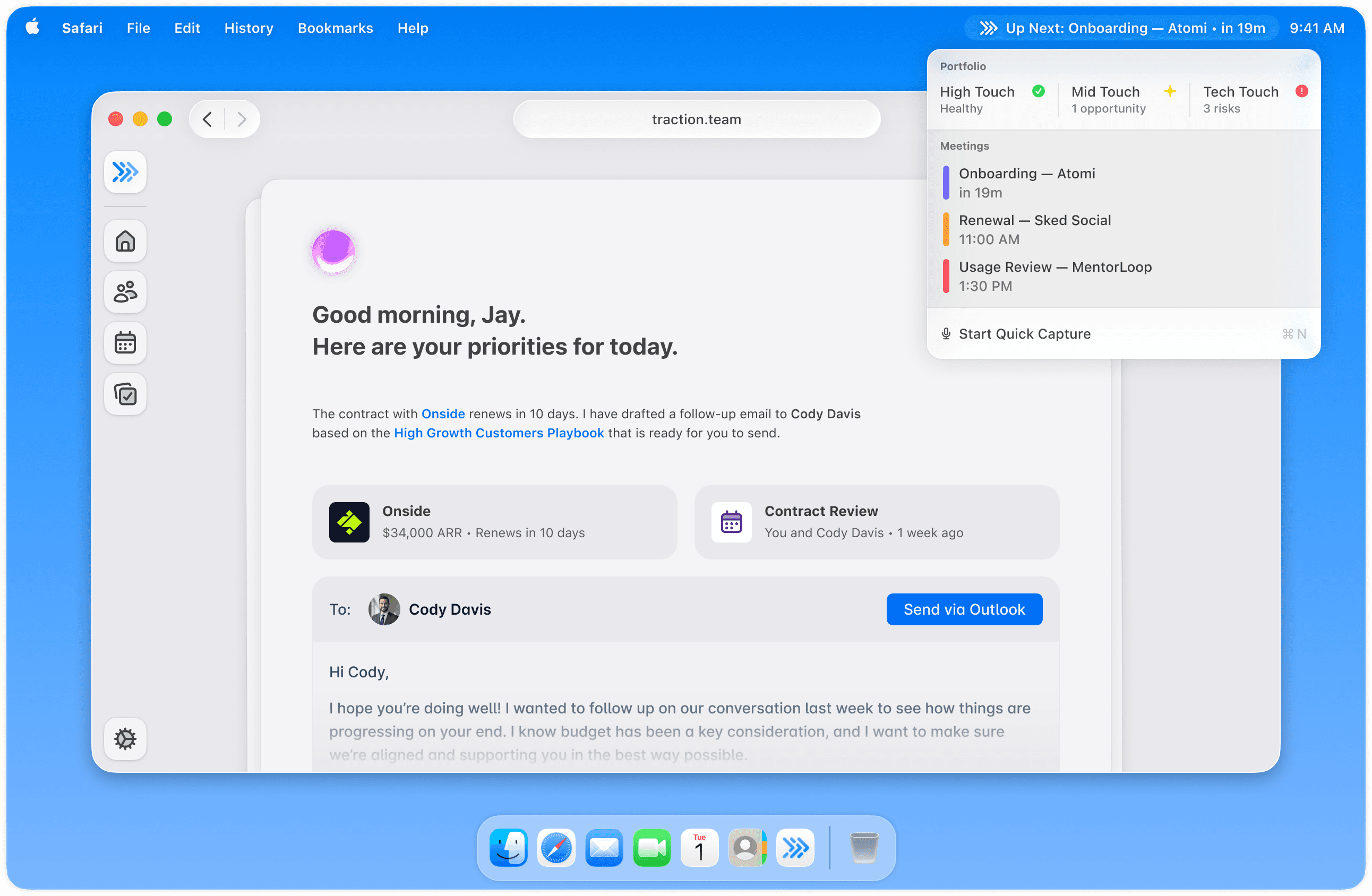
A screenshot showing a Mac desktop. The Traction app is open showing a CSM’s top priorities for the day and a pre-drafted email to follow up with a customer. In the Menu Bar, Traction is running in the background showing the health of the CSM’s customer portfolios and upcoming customer meetings.

Your team can't cover every account. And everyone knows it.

More accounts than hours

You manage 30–50 accounts, but only a few get your attention, putting the rest at risk of churn or lost opportunities.

Drowning in admin overhead

Meetings, follow-ups, and admin work create overhead and consume your time. Urgent issues crowd out proactive actions.

Blind spots everywhere

It’s easy to miss risk signals. Limited visibility can lead you to overlook both churn and growth opportunities.

Your team can't cover every account. And everyone knows it.

More accounts than hours

You manage 30–50 accounts, but only a few get your attention, putting the rest at risk of churn or lost opportunities.

Drowning in admin overhead

Meetings, follow-ups, and admin work create overhead and consume your time. Urgent issues crowd out proactive actions.

Blind spots everywhere

It’s easy to miss risk signals. Limited visibility can lead you to overlook both churn and growth opportunities.

The problem

Current solutions are broken.

Most CS teams have stitched together solutions — Notion for notes, Granola for transcripts, manual CRM updates, and a spreadsheet somewhere.

This isn't a strategy, it's a prayer.

Old-world CSPs promised to fix this. But ask anyone who's been through an implementation: months of setup, huge costs, heavy admin, and in the end: nothing really changes.

Traction is built differently. It runs your long-tail accounts alongside your human team, so your CSMs focus on the relationships that need them.

The problem

Current solutions are broken.

Most CS teams have stitched together solutions — Notion for notes, Granola for transcripts, manual CRM updates, and a spreadsheet somewhere.

This isn't a strategy, it's a prayer.

Old-world CSPs promised to fix this. But ask anyone who's been through an implementation: months of setup, huge costs, heavy admin, and in the end: nothing really changes.

Traction is built differently. It runs your long-tail accounts alongside your human team, so your CSMs focus on the relationships that need them.

Why Traction

Traction is built for the future of CS, today.

‘Super memory’ for every account

Customer context is often trapped in silos or forgotten. Traction provides a shared super memory that retains every detail. The right insights at the right time.
‘Super memory’ for every account

Customer context is often trapped in silos or forgotten. Traction provides a shared super memory that retains every detail. The right insights at the right time.

Always working, even when you’re not

Most AI tools take notes. Traction helps before, during, and after each customer interaction. It prepares notes, manages follow-ups, flags risks, and tracks sentiment.

Always working, even when you’re not

Most AI tools take notes. Traction helps before, during, and after each customer interaction. It prepares notes, manages follow-ups, flags risks, and tracks sentiment.

Multiplies your capacity

Your team can’t be everywhere at once. Traction tends to your book 24/7, delivering the reach and consistency of a larger team. We give your team superpowers.

Multiplies your capacity

Your team can’t be everywhere at once. Traction tends to your book 24/7, delivering the reach and consistency of a larger team. We give your team superpowers.

Your team is always in control

Traction is your proactive assistant that brings actions and insights to you. You make the final call by choosing what to send, share, log or escalate.

Your team is always in control

Traction is your proactive assistant that brings actions and insights to you. You make the final call by choosing what to send, share, log or escalate.

Why Traction

Traction is built for the future of CS, today.

‘Super memory’ for every account

Customer context is often trapped in silos or forgotten. Traction provides a shared super memory that retains every detail. The right insights at the right time.

Always working, even when you’re not

Most AI tools take notes. Traction helps before, during, and after each customer interaction. It prepares notes, manages follow-ups, flags risks, and tracks sentiment.

Multiplies your capacity

Your team can’t be everywhere at once. Traction tends to your book 24/7, delivering the reach and consistency of a larger team. We give your team superpowers.

Your team is always in control

Traction is your proactive assistant that brings actions and insights to you. You make the final call by choosing what to send, share, log or escalate.

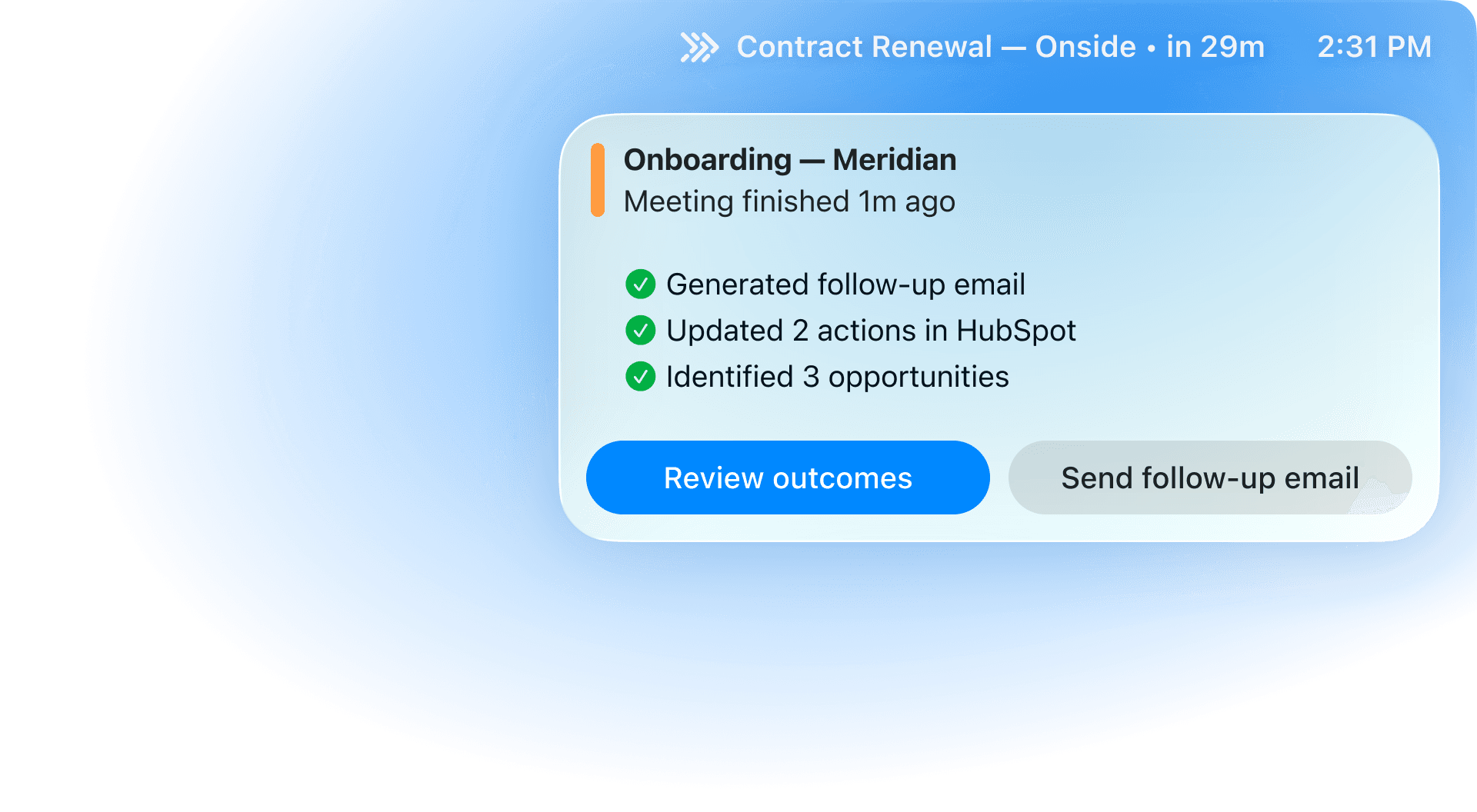
A screenshot showing a Traction notification after a customer meeting has ended. The notification informs the CSM that it has automatically drafted a follow-up email, updated 2 actions in HubSpot, and identified 3 opportunities.

Benefits

Your team, but with superpowers

24/7 account coverage

Proactive attention for all accounts, not just the ones you have time for today.

Hours back in your week

We cut admin work by drafting notes, follow-ups, and updates, leaving more time for relationships.

Centralized account data

All communications together in a single, up-to-date view. No more jumping between tools.

Opportunities that find you

No more hunting. What needs attention surfaces with context, so you can act early and stay ahead.

A screenshot showing a Traction notification after a customer meeting has ended. The notification informs the CSM that it has automatically drafted a follow-up email, updated 2 actions in HubSpot, and identified 3 opportunities.

Benefits

Your team, but with superpowers

24/7 account coverage

Proactive attention for all accounts, not just the ones you have time for today.

Hours back in your week

We cut admin work by drafting notes, follow-ups, and updates, leaving more time for relationships.

Centralized account data

All communications together in a single, up-to-date view. No more jumping between tools.

Opportunities that find you

No more hunting. What needs attention surfaces with context, so you can act early and stay ahead.

How it works

Up and running
in hours, not months.

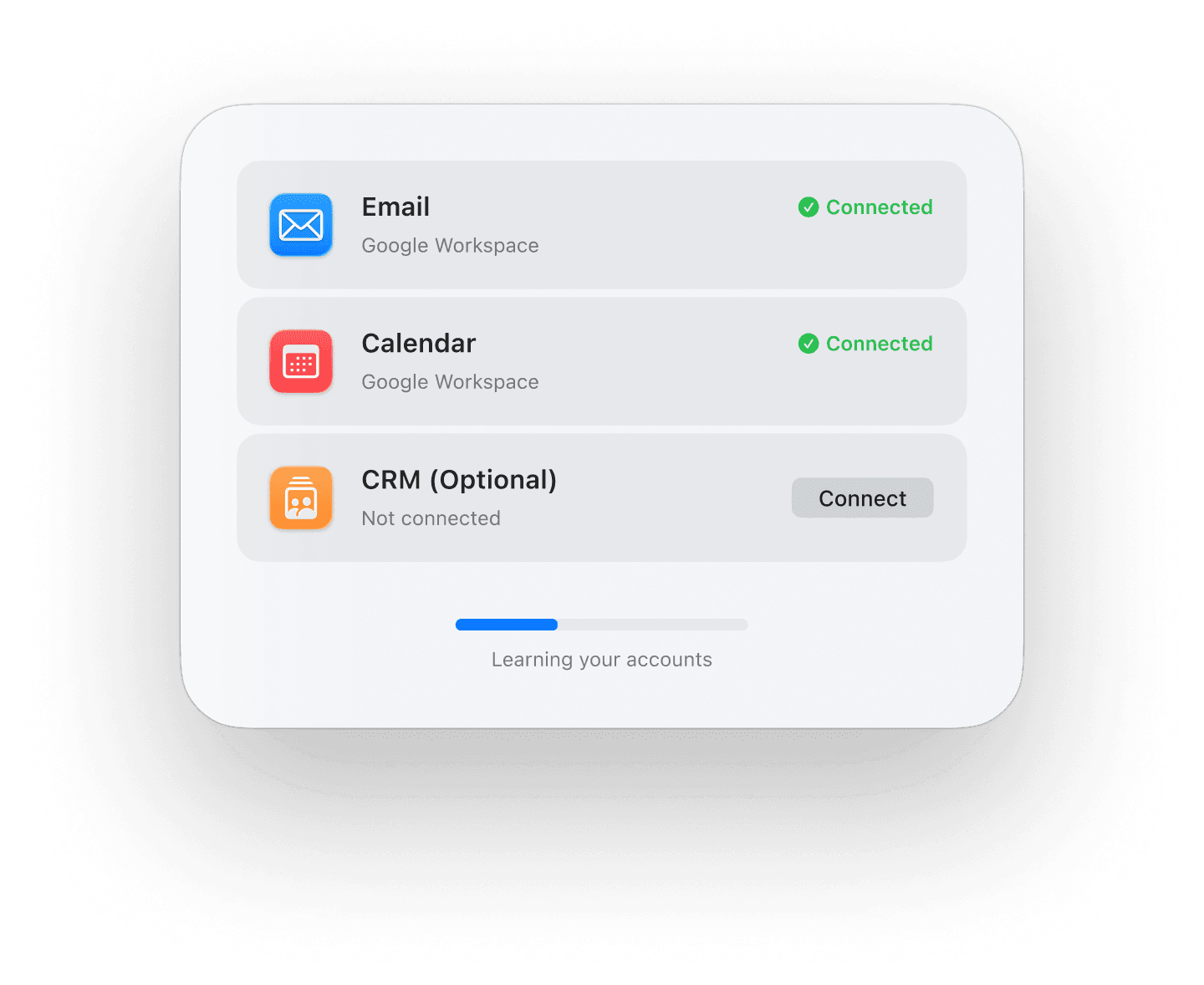
A screen showing Traction has connected to Email, Calendar, and CRM systems and is actively learning customer accounts using this information.

Connect your tools

Connect your email, calendar, and CRM. No migration or manual work.

Traction learns your accounts

See full account history in one place. No more digging through different tools.

Say goodbye to admin work

Traction keeps you prepared, writes follow-ups, and flags what’s important.

How it works

Up and running
in hours, not months.

A screen showing Traction has connected to Email, Calendar, and CRM systems and is actively learning customer accounts using this information.

Connect your tools

Connect your email, calendar, and CRM. No migration or manual work.

Traction learns your accounts

See full account history in one place. No more digging through different tools.

Say goodbye to admin work

Traction keeps you prepared, writes follow-ups, and flags what’s important.

Why Traction

Everything you need.
Nothing you don’t.

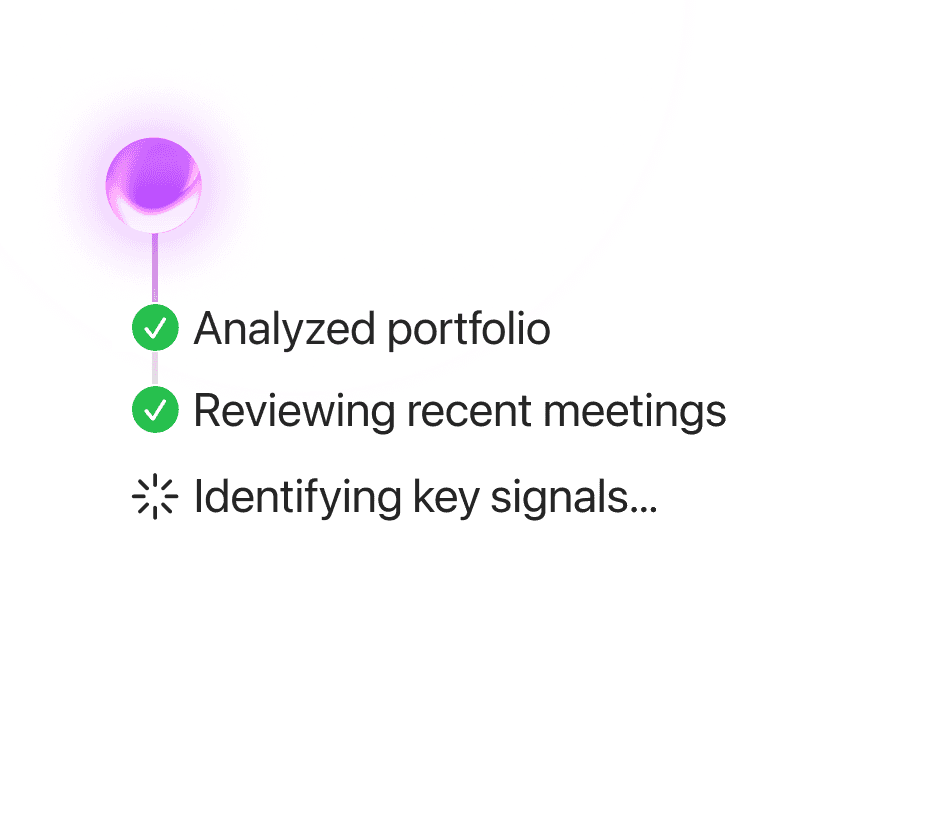
An image showing Traction analyzing a customer portfolio, including reviewing recent meetings, to identify key account health signals.

Account health alerts

Know what needs attention. Traction flags shifts in activity, tone, and engagement.
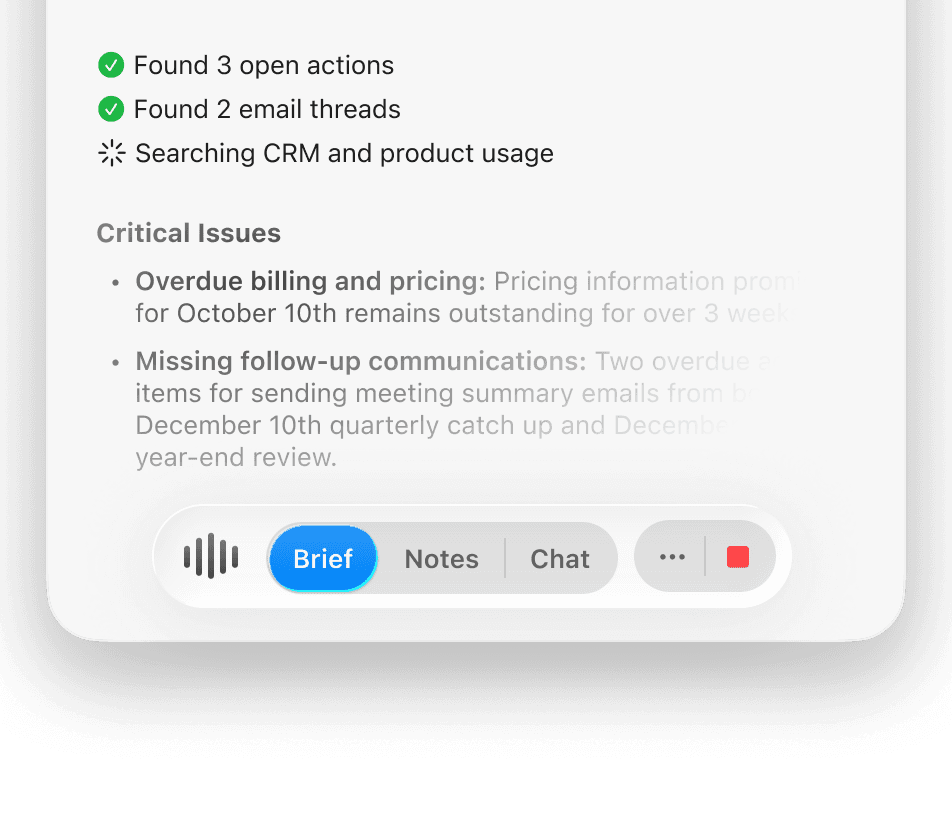
A screenshot showing Traction writing a briefing for an upcoming meeting.

Meeting prep on autopilot

Walk into every call prepared. Get key context in one place and send a drafted follow-up right after.
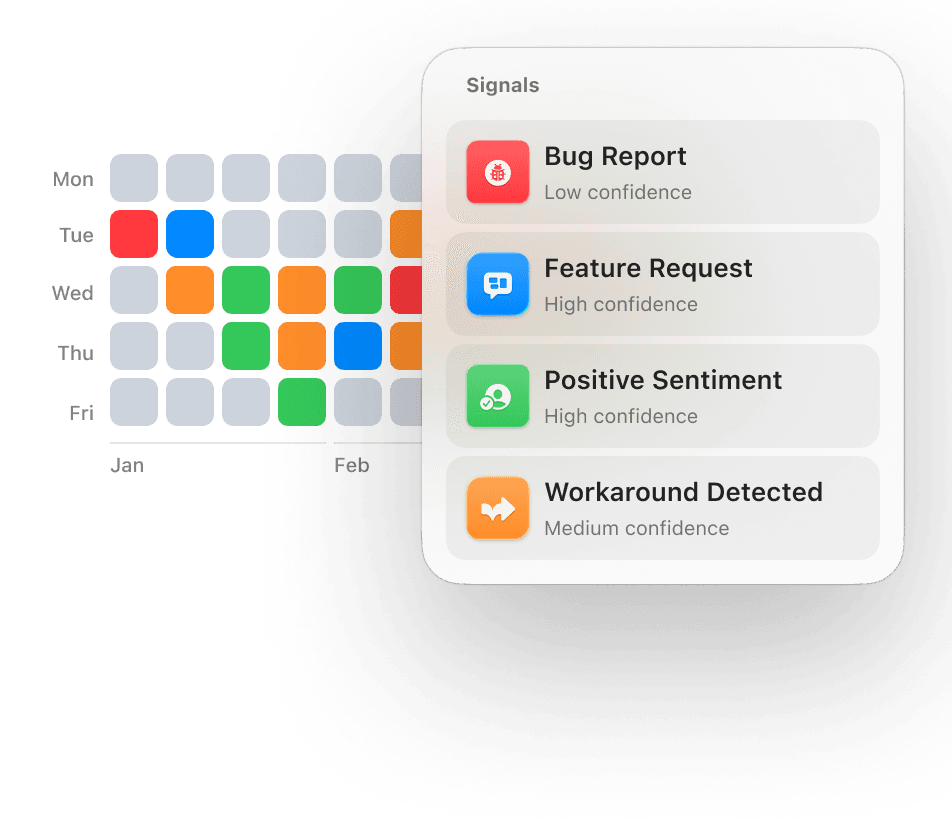
An image depicting a grid where each item represents a day of the year. The grid items show color-coded to indicate positive, neutral, and negative signals identified on each day. A popup shows the signals identified for one of the days: Bug Report, Feature Request, Positive Sentiment, Workaround Detected.

A live map of your accounts

Spot risk early. Traction tracks momentum so you always know how each account is trending.
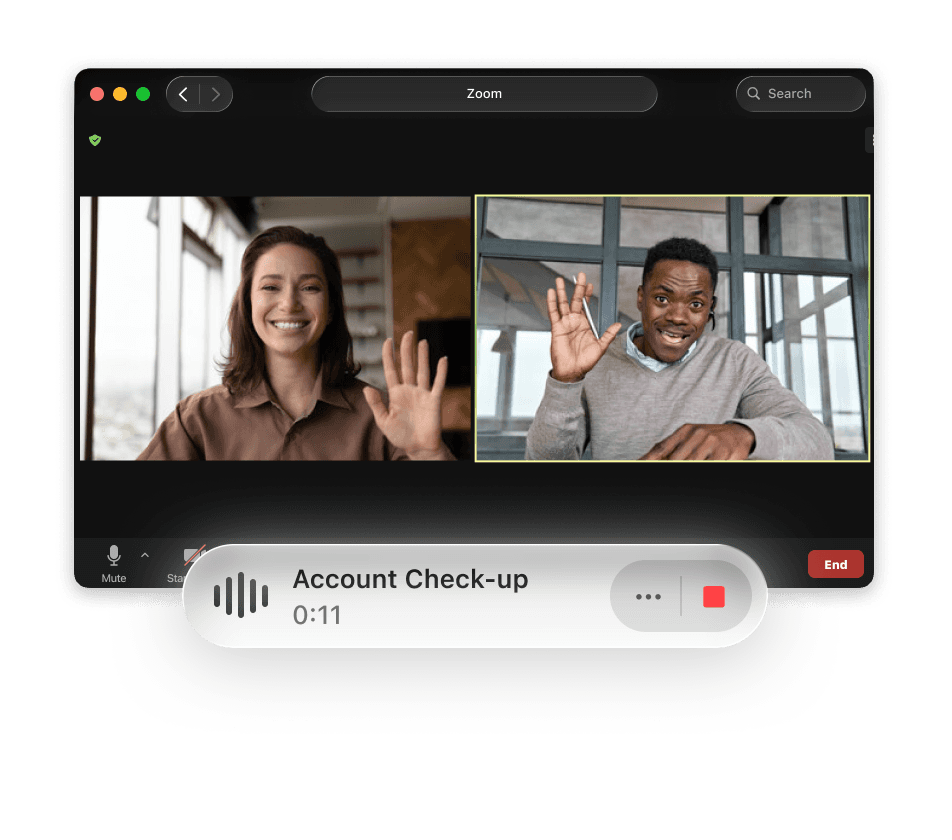
A screenshot of Traction's meeting notetaker running alongside a Zoom call.

Bot-free meeting notetaker

Stay present in meetings, knowing every detail is captured. No distracting bot on your calls.

Why Traction

Everything you need.
Nothing you don’t.

An image showing Traction analyzing a customer portfolio, including reviewing recent meetings, to identify key account health signals.

Account health alerts

Know what needs attention. Traction flags shifts in activity, tone, and engagement.

A screenshot showing Traction writing a briefing for an upcoming meeting.

Meeting prep on autopilot

Walk into every call prepared. Get key context in one place and send a drafted follow-up right after.

An image depicting a grid where each item represents a day of the year. The grid items show color-coded to indicate positive, neutral, and negative signals identified on each day. A popup shows the signals identified for one of the days: Bug Report, Feature Request, Positive Sentiment, Workaround Detected.

A live map of your accounts

Spot risk early. Traction tracks momentum so you always know how each account is trending.

A screenshot of Traction's meeting notetaker running alongside a Zoom call.

Bot-free meeting notetaker

Stay present in meetings, knowing every detail is captured. No distracting bot on your calls.

Compare

Replace the sticky-tape with a purpose-built platform

See how Traction compares to the stack your team is already using.

Your current stack

Traction

Works between meetings

No. Only active during calls.

Yes. Before, during, and after calls.

See the full relationship

Partial. Limited to meetings or CRM data.

Complete. Emails, calls, and CRM data.

Flags risk early

Rarely. Risks reside in dashboards.

Yes. See risks before they escalate.

Handles follow-through

Manual. You do the admin.

One click. All follow-ups handled.

Coverage across accounts

~30% get real attention.

Close to 100%. Every account, 24/7.

Makes you look prepared

Sometimes. If you had time to prep.

Yes. Context and key points prepared.

Compare

Replace the sticky-tape with a purpose-built platform

See how Traction compares to the stack your team is already using.

Your current stack

Traction

Works between meetings

No. Only active during calls.

Yes. Before, during, and after calls.

See the full relationship

Partial. Limited to meetings or CRM data.

Complete. Emails, calls, and CRM data.

Flags risk early

Rarely. Risks reside in dashboards.

Yes. See risks before they escalate.

Handles follow-through

Manual. You do the admin.

One click. All follow-ups handled.

Coverage across accounts

~30% get real attention.

Close to 100%. Every account, 24/7.

Makes you look prepared

Sometimes. If you had time to prep.

Yes. Context and key points prepared.

You might be wondering

Frequently Asked Questions

How is Traction different from a meeting transcription tool?

Tools like Granola or Otter capture what was said. Traction captures what it means, and then acts on it. It builds context before the call, drafts follow-ups after, and tracks sentiment over time. It’s not a recorder. It’s a relationship assistant.

Does Traction replace my CSMs?

No. Traction handles the operational work — monitoring, prep, follow-ups, CRM updates — so your CSMs can focus on the relationships that actually need a human. Your team stays in control of every action.

How long does Traction take to set up?

Minutes. Connect your email, calendar, and CRM, and Traction starts learning immediately. No data migration, no multi-week onboarding.

Will Traction work with the tools we already use?

Yes. Traction integrates with your CRM, email, calendar, and communication platforms. Everything syncs back automatically; you’re not adding a silo, you’re consolidating them.

What if the AI gets something wrong?

Every draft and action goes through you before anything happens. If something doesn’t look right, you can edit or dismiss it.

How does Traction help my team scale without adding headcount?

Traction gives every CSM 24/7 AI coverage. Admin happens automatically with human approval. Each CSM can manage more accounts without sacrificing quality.

How is Traction different from Gainsight/ChurnZero?

Traditional platforms give dashboards and expect your team to spot the patterns. Traction proactively surfaces risks and handles operational work; think of it as the layer that makes your existing stack actually work.

Will my CRM data stay up to date?

Yes. Everything syncs back automatically. No more chasing CSMs to update records.

Is our customer data safe?

Customer data is encrypted, access-controlled, and never used to train AI models.

What does onboarding look like for a full team?

Same simplicity as an individual setup. Each CSM connects their tools. Most teams are fully up and running within days, not months.

If you have more questions, feel free to contact us.

More accounts. Same team.
Zero surprises.  

More accounts. Same team. Zero surprises.  

See how Traction helps you scale your accounts without adding headcount.

See how Traction helps you scale your accounts without adding headcount.

AI-powered Customer Intelligence for CS Teams

© 2026 Traction Platforms Pty Ltd